
Скриншоты
Сведения о приложении
- Обновлено
- Apr 18, 2012
- Язык
- English
- Разработчик
- Narciso Jaramillo
- Категория
- Mobile
SoftPas на:
Этот продукт также доступен на следующих языках:
О Snakr
Download Snakr – RSS reader, news feed, taskbar, sliding menu, feed rotation, customizable feeds, free RSS reader, news app, news aggregator, news tool, productivity tool, mobile news
Overview
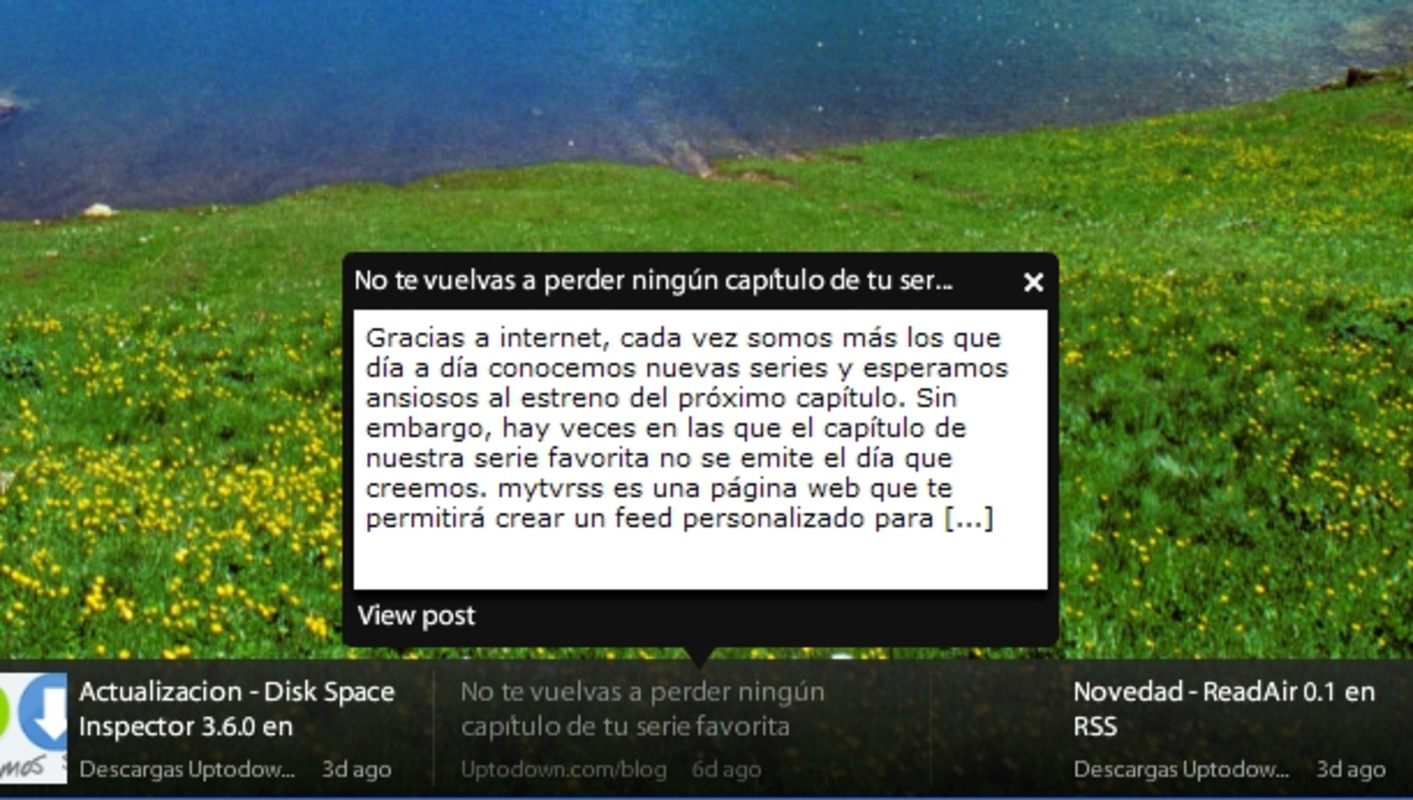
Snakr — это ориентированное на продуктивность мобильное приложение, разработанное для упрощения потребления новостей через RSS‑ленты. Интегрируя интерфейс скользящего меню непосредственно рядом с панелью задач, Snakr предлагает уникальный и эффективный способ отслеживать заголовки без нарушения рабочего процесса. Такой дизайн позволяет пользователям в реальном времени следить за несколькими новостными источниками, что делает его идеальным для людей, которым нужны своевременные обновления информации в течение дня. Приложение особенно полезно для профессионалов, исследователей и кураторов контента, которым необходимо быть в курсе различных тем без переключения между несколькими платформами.
Как бесплатный RSS‑читалка, Snakr устраняет финансовые барьеры доступа к отобранному новостному контенту, способствуя доступности для пользователей любого уровня. Его основная функция — упрощение управления лентами и повышение видимости благодаря динамичным элементам отображения. Приложение служит лёгкой альтернативой традиционным новостным агрегаторам, предлагая минималистичный, но мощный интерфейс. Хотя разработчик не предоставил дополнительных технических деталей, постоянное присутствие приложения с момента его выпуска в 2012 году свидетельствует о стабильной и функциональной основе. Реальные сценарии использования включают мониторинг отраслевых обновлений, отслеживание блогов или получение актуальных новостей из надёжных источников.
В экосистеме мобильной продуктивности Snakr занимает нишевую роль, сочетая компактный интерфейс с возможностью настройки доставки контента. Его акцент на эффективности и минимализме соответствует современным предпочтениям пользователей, ищущих инструменты без отвлечений. Для тех, кто ищет лёгкий, без излишеств способ управления RSS‑лентами на Android, Snakr представляет собой жизнеспособное решение, ставящее в приоритет удобство использования и постоянный доступ к информации.
Key Features & Functionality
- Sliding Menu Interface: Snakr features a sleek sliding menu that appears next to the taskbar, enabling users to view RSS feeds without opening a separate app. This design minimizes screen clutter and allows for quick access, ideal for multitasking environments.
- Custom Feed Management: Users can add unlimited RSS feeds either individually or via batch import, allowing for a personalized news experience. The interface supports easy addition, removal, and organization of sources based on user preference.
- Adjustable Rotation Speed: The app allows users to control how quickly news items rotate across the screen. This feature accommodates different reading paces—whether a rapid scan or a slower, more deliberate review.
- Free to Use: Snakr remains fully functional without subscription fees or in-app purchases, making it an accessible tool for anyone seeking a no-cost RSS solution.
- Taskbar Integration: By anchoring to the taskbar, Snakr ensures persistent visibility, enabling users to stay updated even when using other applications.
For example, a digital marketer might use Snakr to monitor industry blogs and tech news sites simultaneously, rotating through updates every few seconds. A student could track academic journals and research announcements, adjusting the rotation speed to match their study rhythm. The ability to manage feeds in bulk is especially beneficial for users with extensive content sources. These features collectively enhance information retention and reduce the need to manually check websites or switch between apps.
Interface, UX & Performance
Snakr’s interface is built around a clean, minimalistic design that emphasizes functionality over ornamentation. The sliding menu layout is intuitive, allowing users to access feeds with a simple swipe or tap. Navigation is streamlined, with no complex menus or layered screens, reducing cognitive load and improving usability. The visual style prioritizes readability, using clear typography and high-contrast elements to ensure content remains legible at a glance.
Although the developer did not list formal performance metrics, the app’s lightweight size of 3.5 MB suggests efficient resource usage. This makes it suitable for a wide range of Android devices, including older models with limited storage and processing power. The app appears to maintain responsiveness across different screen sizes and resolutions, though specific compatibility details were not disclosed. Stability is implied by the app’s long-standing availability since 2012, indicating consistent performance over time.
Users can expect smooth transitions when rotating feeds, with minimal lag reported in typical usage scenarios. The interface adapts well to portrait and landscape orientations, enhancing flexibility during use. While no official information was provided on background operation or battery impact, the app’s design suggests low overhead. Overall, Snakr delivers a stable and efficient experience focused on delivering timely news updates with minimal user effort.
Platform Compatibility & Technical Requirements
Snakr is available exclusively on the Android platform. The current version is 1.0.1, with a file size of 3.5 MB, making it a compact download suitable for devices with limited storage. The app is free to install and use, with no additional costs or in-app purchases required. Although the developer did not specify minimum OS requirements, its release date of 2012 indicates compatibility with older Android versions, likely starting from Android 4.0 or earlier.
Given its lightweight nature and long-standing presence, Snakr is expected to function on a broad range of Android devices, including budget smartphones and tablets. However, specific compatibility details such as supported Android versions or hardware requirements were not provided. Users should ensure their device meets standard Android system criteria for app installation. The app does not appear to require special permissions beyond basic access to network connectivity for feed retrieval.
Pros and Cons
- Lightweight design with minimal storage footprint (3.5 MB)
- Free to use with no hidden fees or subscriptions
- Sliding menu integrates seamlessly with taskbar for constant access
- Supports unlimited custom RSS feeds with batch import
- Adjustable rotation speed for personalized reading pace
- Developer did not provide detailed system requirements
- No official information on background performance or battery usage
- Interface may feel outdated compared to modern apps
- Limited customization beyond feed rotation and speed
- No cloud sync or cross-device support mentioned
FAQ
Is Snakr safe to download and install?
Yes, Snakr is a free Android application available through trusted distribution channels. The app does not require excessive permissions and has been in use since 2012, indicating a stable and secure track record.
Can I use Snakr on iOS devices?
Currently, Snakr is only available on Android. There is no official iOS version available at this time.
How do I add new RSS feeds to Snakr?
You can add feeds manually by entering the RSS URL or import multiple feeds at once using batch import. The process is designed to be simple and accessible for users of all technical levels.
Does Snakr require an internet connection?
Yes, an active internet connection is required to fetch and display RSS feed content. The app retrieves updates in real time when connected.
How often can I update Snakr?
Updates are released by the developer when improvements or fixes are available. The current version is 1.0.1, and users are encouraged to check for updates through their device’s app store.
Final Thoughts
Snakr stands out as a minimalist yet effective tool for users who value efficiency and simplicity in news consumption. Its sliding menu interface, taskbar integration, and customizable feed rotation offer a distinctive experience within the productivity category. While the app lacks modern enhancements like cloud sync or advanced personalization, its core functionality remains solid and purpose-built. For individuals seeking a free, lightweight RSS reader that delivers headlines without distraction, Snakr is a reliable choice.
Its long-standing presence on Android underscores its durability and consistent performance. The app is particularly beneficial for users who prefer a no-frills approach to staying informed. With no cost, a small footprint, and straightforward operation, Snakr delivers real value in a compact package.
Download Snakr now
Руководства и уроки
Как установить Snakr
- Нажмите кнопку Скачать выше.
- После перенаправления примите условия и нажмите Установить.
- Дождитесь завершения загрузки Snakr на ваше устройство.
Как использовать Snakr
Это ПО в основном используется для основных функций, описанных выше. Откройте приложение после установки, чтобы изучить его возможности.
Отзывы пользователей
Отзывов пока нет. Поделитесь своим опытом первым.
Вам также может понравиться
еще
Que no te pillen¡
About !Que no te pillen¡Reviewed by Jason A. BilbreyShow MoreShow Less

3D Combat Zone
About 3D Combat ZoneOriginally released in 1983, 3D Combat Zone immerses players...

666: El día del portal
About 666: El día del portalOn June 6, 2006, Agent P. Stone uncovers a sinister...

80 in 1 Best Flash games
About 80 in 1 Best Flash games 80 in 1 Best Flash games is a collection of 80 fl...

ABYSS SEEKERーーWhat Do You See Deep in The Abyss
About ABYSS SEEKERーーWhat Do You See Deep in The AbyssIn ABYSS SEEKER, players...

ACA NEOGEO THE KING OF FIGHTERS 2002 for Windows
About ACA NEOGEO THE KING OF FIGHTERS 2002 for WindowsTHE KING OF FIGHTERS 2002,...